Barber and hair salon
Pharos handles your shop's appointments, walk-in queue, and till.
It spots an empty chair at once and suggests your past customers to fill the quiet hours of the day.
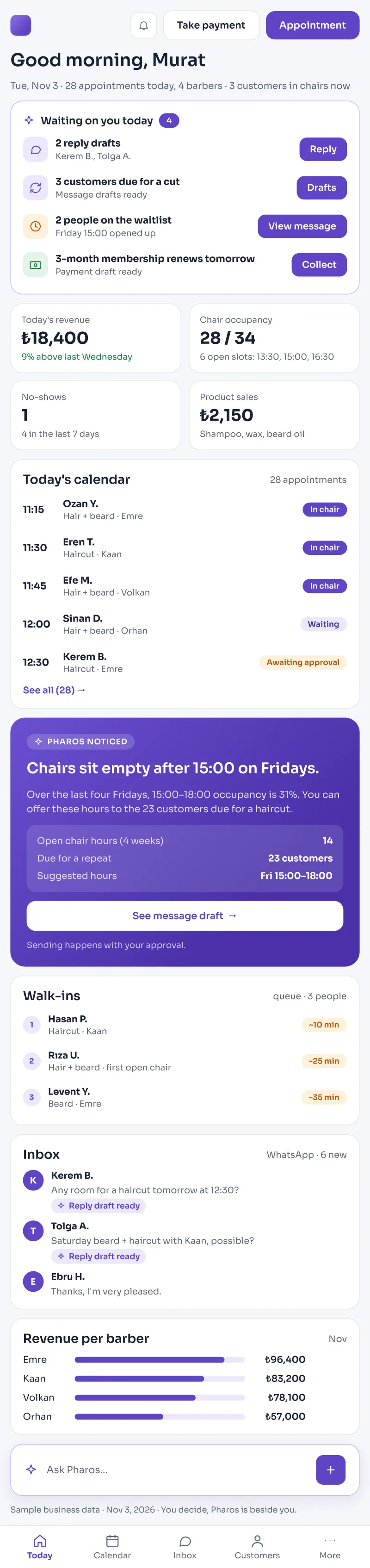
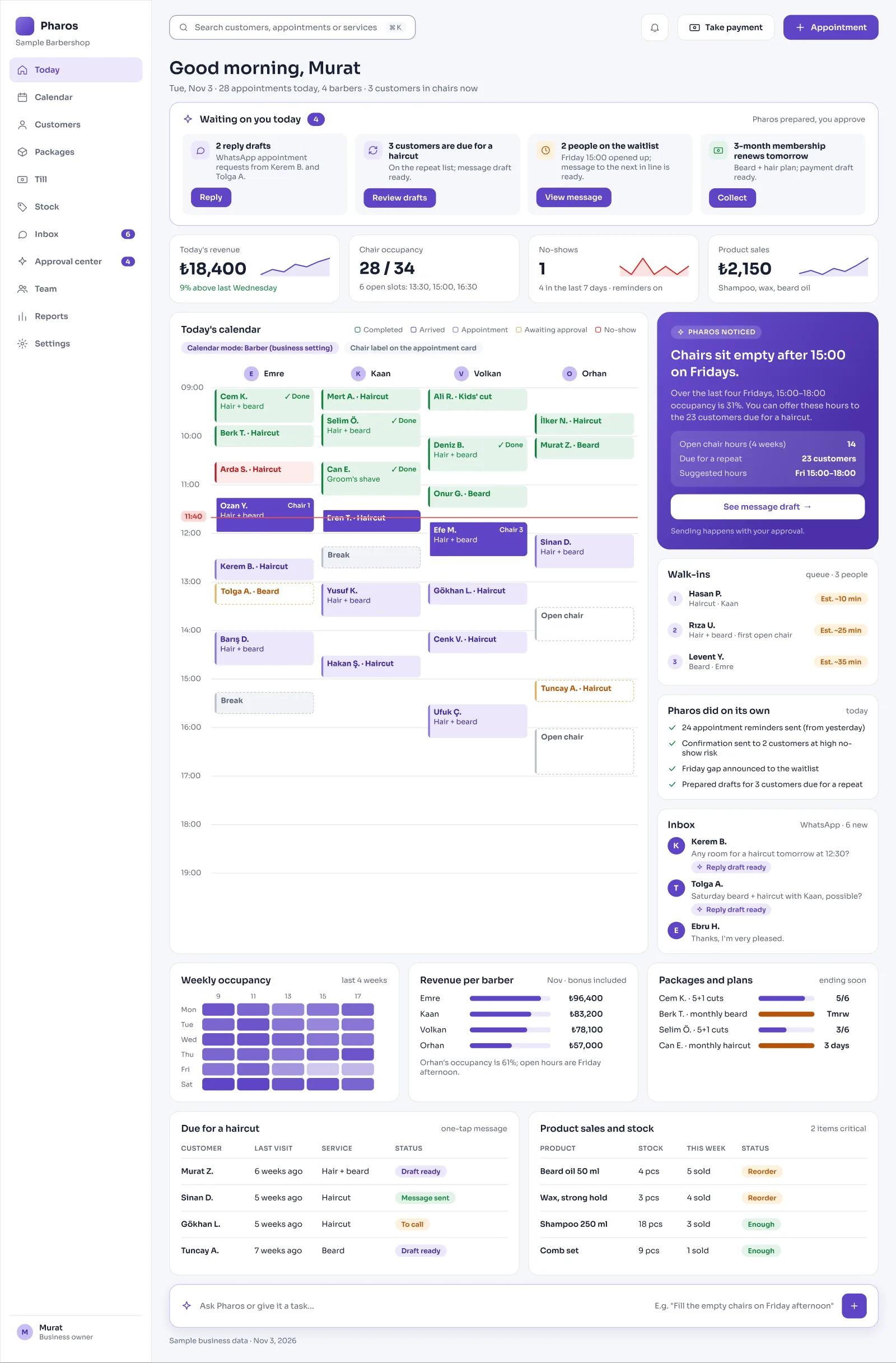
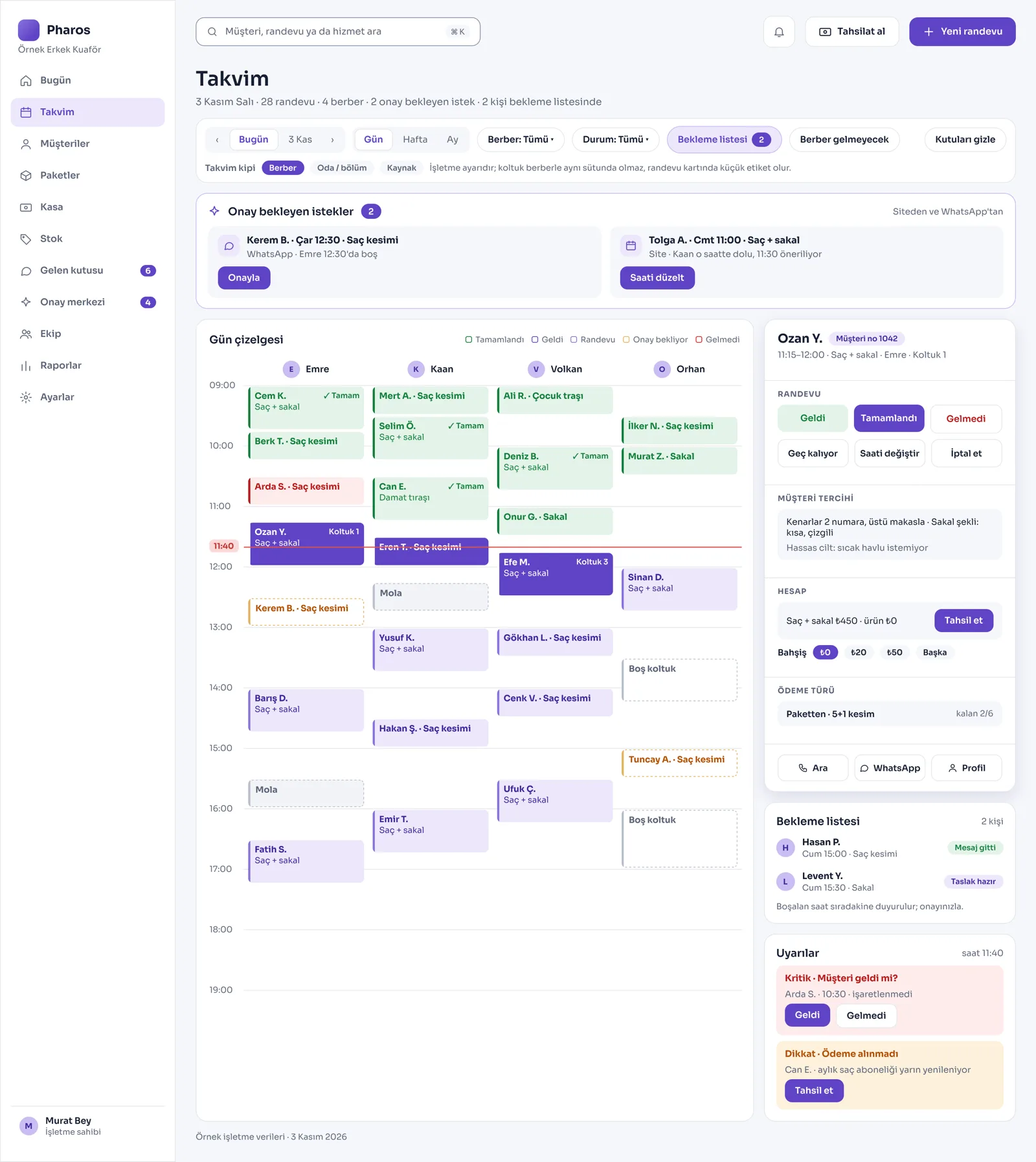
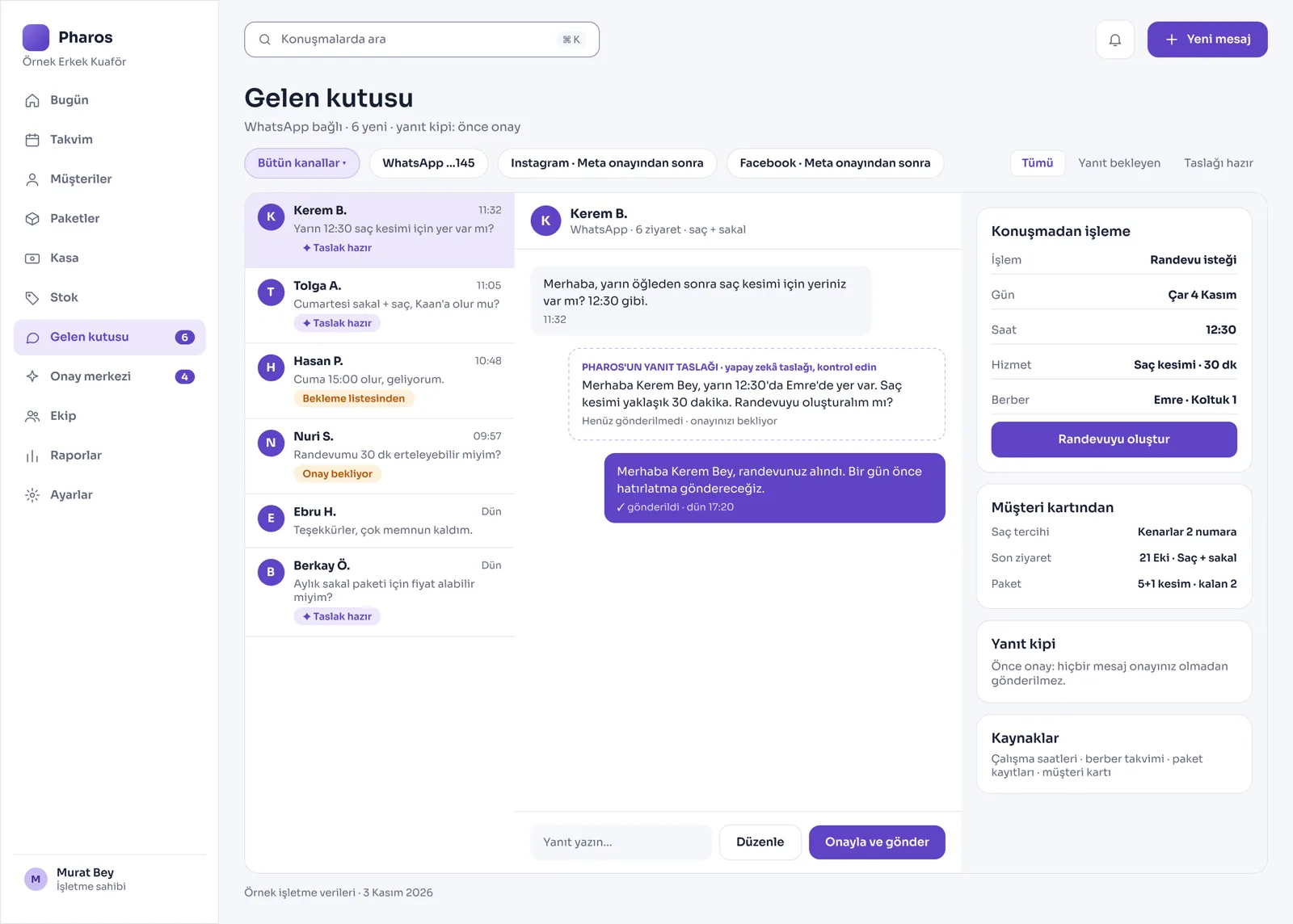
Screens from the Panel
This is how Pharos looks in your business.
Names and numbers on the screens are examples.
A Day in Your Business
Opening the Shop: Your customers booked their appointments on your website long ago; each barber's and stylist's daily plan is ready on the calendar.
During the Day: You add walk-in customers to the queue. You see past customers who are due for a shave or treatment, and you send them a reminder with one tap.
No Longer Your Problem
- Running to the phone with scissors in hand all day to write down appointments one by one.
- Closing the day inefficiently without noticing which hours the chairs sat empty.
- Working out each barber's commission, earnings, and till share by hand at the end of the day.
What Pharos does in your business
What Does Pharos Do for Your Barbershop or Hair Salon?
Smart Appointment and Queue Management
- Online Booking, 24/7: Your customers open your shop's website on their phones at any time, pick the barber they want, and book their own appointment.
- Color Day Calendar: A separate column for each stylist or barber, with a color calendar that shows the status of each job (Arrived, Completed, No-show). The system warns you about appointments that are past their time but not marked.
- Multi-Service Planning: Plan several jobs in one visit, such as a haircut together with a beard trim or a treatment.
- Break and Time-Off Settings: Enter your barbers' breaks and time off and the shop's closed hours, and stop appointments from being given for those times automatically.
- Queue for Walk-Ins: Add customers who come without an appointment to a digital queue. Pharos sends the next customer in line an estimated wait time on WhatsApp automatically.
- Waiting List and Cancellation Tracking: When an appointment is cancelled, the system messages the customer waiting on the list automatically and fills the empty chair.
Customer Loyalty and Filling Chairs
- Win-Back List: Lists customers who are due for a shave or treatment and past customers who have not visited the shop in a long time; one tap lets you remind them of you.
- Smart Open-Slot Announcement: Shows the day's open slots and the empty chair alert on the panel. If you wish, it suggests announcing these open slots to your customer list with a bulk message to fill the chairs.
- Advanced Customer Card: Keeps the customer's past visits, spending at your shop, hair and beard preferences, special notes, and any allergies on one screen.
- Membership and Package System: Set up prepaid sessions such as "buy 5 haircuts, get 1 free". Create monthly memberships for hair and beard that renew and are charged automatically each month.
- Wallet Card and Points: Define loyalty points. Let your customers add their membership cards to Apple Wallet or Google Wallet.
- Campaigns: Set up a discount for a date range, for new customers or for a specific service; the till amount comes from the campaign.
Till, Stock, and Staff Commission
- Fast Payment and Tips: Add extra services or products sold to the bill from the appointment card. Take payment in cash or by card, and record tips even after the bill is closed.
- Staff Commission: It calculates the commission and earnings each barber or stylist makes from the jobs they do, and puts the monthly commission report in front of you.
- Cosmetics and Product Sales: Track your counter sales and stock, such as shampoo, wax, or care oil. A "running low" list keeps you from missing the time to restock.
- Safe End-of-Day Close: Keeps the daily income and expense ledger. Even if the internet goes down, the day calendar and the till keep working.
- Service Cost and Profit: Counts the materials used, and produces reports on your shop's net occupancy, revenue, and earnings per barber.
Communication and Digital Management
- Advanced WhatsApp Management: Prepares an automatic appointment draft for a customer who writes on WhatsApp. You can set the reply mode to off, draft, or automatic, depending on how busy the shop is.
- Deposit and Security: You can take a deposit when an appointment is booked online, and set a cancellation fee rule for late cancellations.
- Website Updated from the Panel: Your shop gets its own website, and you update it directly from the Pharos panel.
- Roles and Permissions: Set your staff's roles and decide for yourself what they can see and write on each screen.
Is there something specific to your barbershop or hair salon that is not on the list? Write it below, and we will tell you right away whether we can add it to Pharos.
Frequently Asked Questions
Can my customers book their own appointments from their phones?
Yes. Your customers open your shop's website and pick the barber they want, the service, and a free time, and book an appointment 24/7.
Does it call back customers who haven't come in for a long time?
Yes. It automatically lists customers who have not come to the shop for longer than the period you set, and prepares message drafts made for your hair salon to help you win them back.
If several barbers work here, can I see who is busy and who is free?
Yes. The day calendar has a separate column for each barber. You can follow live who is doing which job at what time and which chair is empty.
Let us map out your first roadmap together.
Tell us about your shop. We prepare your free roadmap and a personal demo. No commitment.
Apply